Does WGU Accept Sophia Learning Credits?
Yes — WGU accepts Sophia Learning credits and publishes Sophia-specific transfer pathways. But you must finish every credit before you start your term, or it won't count.

The Short Answer: Yes, WGU Accepts Sophia Credits
WGU accepts Sophia Learning credits, and it's one of the most Sophia-friendly schools you'll find. WGU publishes official Sophia transfer pathways — course maps that show exactly which Sophia courses satisfy which WGU requirements — for programs across its colleges (Business, IT, Health, and Teachers College).
Because both Sophia and WGU are built around fast, affordable, competency-based learning, they pair unusually well. But there's a catch that costs students credits every single term, so read the next section carefully.
The One Rule That Trips Everyone Up: Finish Before You Start
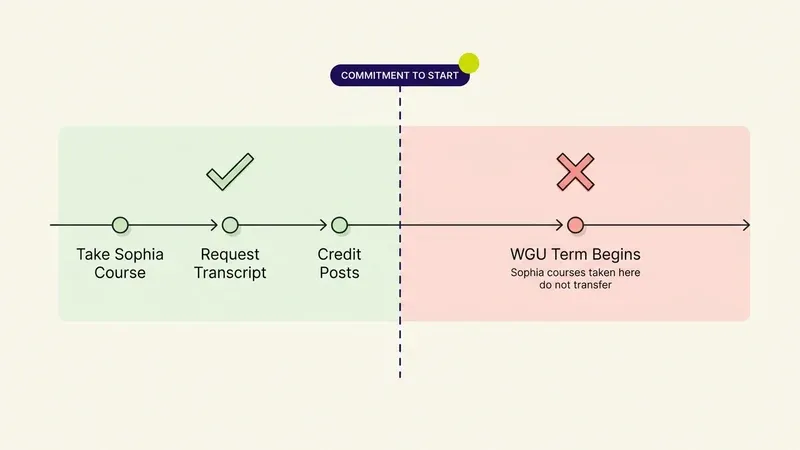
Here's the rule people learn the hard way: all your Sophia credits must be completed and your official transcript submitted before you sign your Commitment to Start and begin your first WGU term. WGU does not accept transfer credit once you've started your program.
In plain terms:
- ✅ Finish the Sophia course → request the transcript → then start at WGU. It counts.
- ❌ Start at WGU first, then try to knock out Sophia courses mid-term to transfer in. It won't count.
This is why speed matters so much with Sophia and WGU: every course you finish before enrolling is a course you don't pay WGU term fees to complete. Every course you finish after starting is wasted for transfer.
The single most expensive mistake in the entire process is signing your Commitment to Start before your Sophia transcript has posted — after that date, no amount of finished coursework will count.
How WGU Transfer Pathways Work
WGU publishes program-specific Sophia pathways. Instead of guessing whether a course counts, you look up your intended WGU degree and see the exact Sophia courses that map to it. A few things to know:
- Pathways are organized by WGU college (e.g., the College of Business, School of Technology).
- They cover mostly general education and lower-division requirements.
- Some core "domain" courses in your major must be taken at WGU and can't be transferred in — the pathway will show which.
Always pull the pathway for your specific program before you buy a Sophia course, so you only take courses that actually count.
How Many Sophia Credits Can Transfer to WGU?
WGU caps transfer credit at roughly 75% of the degree, shared across all your transfer credit (Sophia, prior college, other ACE providers combined). For most students that means:
- Sophia can clear a large chunk of your general-education and lower-division requirements.
- The upper-division, major-specific competencies are earned at WGU.
The practical play is to front-load as many pathway-approved Sophia courses as you can before enrolling, then let WGU's flat-rate term structure carry the major coursework.
Common Mistakes When Transferring Sophia Credits to WGU
Most students who lose Sophia credit don't lose it to a rejected course — they lose it to bad sequencing. These are the mistakes that show up most often:
Avoid these
- Signing the Commitment to Start too early. This is the mistake that costs the most credit. If your transcript hasn't posted yet, wait — once you've committed, WGU stops counting new transfer credit, no exceptions.
- Taking a Sophia course that isn't on your program's pathway. Pathways are specific to each WGU degree. A course that transfers for the Business pathway may not map to anything in the IT pathway, so paying for it and passing it doesn't guarantee it counts.
- Assuming a passed Milestone transfers itself. Completing a Sophia course only unlocks your transcript — it doesn't send it. You still have to request the official transcript yourself and route it to WGU's admissions office.
- Switching your intended degree program mid-process. If you change majors after mapping out your Sophia courses, re-pull the pathway for the new program before taking anything else. Course-to-requirement mappings aren't universal across WGU's colleges.
- Treating "in review" as "posted." A submitted transcript sitting in review isn't confirmed credit yet. Don't sign your Commitment to Start until the credit actually shows against a requirement in your student portal.
Step-by-Step: Transfer Sophia to WGU
- Pick your WGU program and enrollment date.
- Pull the Sophia transfer pathway for that program and list every Sophia course that maps to a requirement.
- Take those Sophia courses — and only those — while you're still pre-enrollment.
- Request your official Sophia transcript and have it sent to WGU.
- Confirm the credits posted, then sign your Commitment to Start and begin your term.
How to Verify Your Sophia Credits Actually Posted
Don't take a submitted transcript on faith. Before you sign anything, confirm the credit is real and correctly applied:
1 Log into your WGU student portal
Check your transfer credit evaluation status directly rather than relying on an email confirmation — statuses can lag behind what's actually been processed.
2 Match credit to a specific requirement
Confirm each Sophia course shows against the exact requirement it's supposed to satisfy, not as unassigned or generic elective credit that may not count where you need it.
3 Check the credit hours
Compare the posted hours against the ACE recommendation for that course. A mismatch usually means the evaluation isn't finished yet, not that the course was rejected.
4 Follow up if it's been more than a few weeks
Transcript evaluations can take time, but if yours hasn't updated within WGU's typical processing window, contact your enrollment counselor before you sign your Commitment to Start — not after.
Finish Sophia Before Your WGU Term Starts
Because WGU only counts Sophia credits completed before you start, the entire strategy rewards finishing fast. Sophia is a flat $99/month for unlimited courses, so a focused month or two before enrollment can clear a semester's worth of requirements.
Sophia's Challenges and Milestones are open-book, unproctored, multiple-choice assessments — the kind a study assistant is genuinely built for. SolveHog reads your Sophia Milestone or Challenge question on the page and surfaces the answer in one click, with optional explanations so the material actually sticks. If your goal is to pass Sophia Milestones and finish fast before your WGU start date, that's exactly what it's for. (It doesn't touch Touchstones — those are written and plagiarism-checked.)
New to how Sophia transfer works overall? Start with our pillar guide: What Colleges Accept Sophia Learning Credits?
Frequently Asked Questions
Does WGU accept Sophia Learning credits?
Yes. WGU accepts Sophia credits and publishes program-specific transfer pathways showing which Sophia courses satisfy which WGU requirements — as long as you complete them before you start your first term.
Can I transfer Sophia credits to WGU after I've started?
No. WGU only accepts transfer credit completed and submitted before you sign your Commitment to Start. Sophia courses finished after your term begins won't count toward your degree.
How many Sophia credits can I transfer to WGU?
WGU caps total transfer credit at roughly 75% of the degree, shared across all transfer sources. Sophia is best used for general-education and lower-division requirements; upper-division domain courses are completed at WGU.
Is Sophia cheaper than taking the courses at WGU?
Often, yes — Sophia is a flat $99/month for unlimited courses, so finishing several pathway courses in one subscription month before enrolling can lower your total cost and shorten your time at WGU. Always confirm each course counts via the official pathway first.